# dlib-face-recognition-android
**Repository Path**: zeners/dlib-face-recognition-android
## Basic Information
- **Project Name**: dlib-face-recognition-android
- **Description**: Android app to demo dlib face recognition
- **Primary Language**: Unknown
- **License**: MIT
- **Default Branch**: master
- **Homepage**: None
- **GVP Project**: No
## Statistics
- **Stars**: 0
- **Forks**: 0
- **Created**: 2019-11-01
- **Last Updated**: 2020-12-19
## Categories & Tags
**Categories**: Uncategorized
**Tags**: None
## README
# dlib-face-recognition-android
Recognize faces in android using dlib state-of-the-art face recognition model based on deep learning. The model has an accuracy of 99.13% on the LFW benchmark.
## App
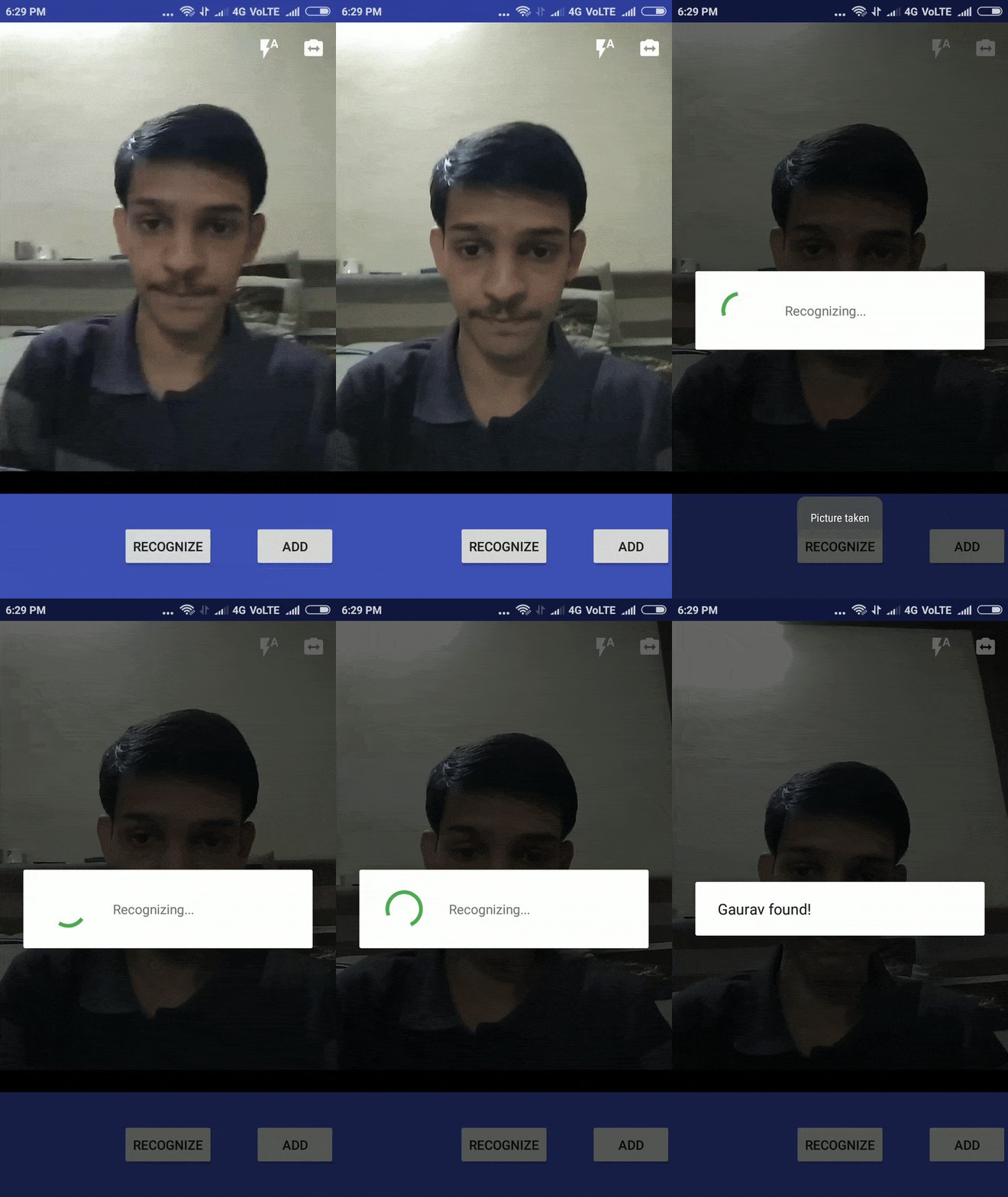
Face recognition is very accurate but it takes approximately 6 seconds on a Redmi4 with Snapdragon 435 and Android 7.1.
 ## Usage
git clone --recursive https://github.com/gv22ga/dlib-face-recognition-android.git
Now you can directly open the `dlib-face-recognition-app` in android studio
## Build JNI (Optional)
First get the required libraries
./envsetup
To build native code and copy to android studio's project manually
cd [dlib-face-recognition-android]
ndk-build -j 2
cp -r libs/* dlib-face-recognition-app/dlib/src/main/jniLibs
Please see [dlib-android](https://github.com/tzutalin/dlib-android) for more details
## Dlib 19.9
This project uses dlib 19.9. Due to some c++11 issues, I had problem compiling dlib 19.9 with opencv. So I made some small changes in `dlib/dlib/serialize.h`, `dlib/dlib/dnn/layers.h`, `dlib/dlib/geometry/rectangle.h`, `dlib/dlib/image_transforms/interpolation.h`, `dlib/dlib/dnn/loss.h`, `dlib/dlib/statistics/running_gradient.h` and `dlib/dlib/global_optimization/global_function_search.cpp` files in dlib library.
## Sample code
```java
// recognize person
FaceRec mFaceRec = new FaceRec(Constants.getDLibDirectoryPath());
List results = mFaceRec.recognize(image_bitmap);
for(VisionDetRet n:results) {
Log.d(TAG, n.getLabel()); // prints the name of recognized person
}
// add person
// add the person image to dlib_rec_example/images directory with name `[PersonName].jpg`
mFaceRec.train()
```
## Image Quality
You can change the parameters `INPUT_SIZE` in `MainActivity.java` and `MAX_IMAGE_SIZE` in `AddPerson.java` if recognition is not working accurately.
## Todos
This app currently uses [HOG based face detector](http://dlib.net/dnn_introduction_ex.cpp.html). This detector fails to detect small faces and is not very accurate. Instead we can use [CNN based face detector](http://dlib.net/dnn_mmod_face_detection_ex.cpp.html), which is very accurate but will take much more time.
## License
[MIT](https://github.com/gv22ga/dlib-face-recognition-android/blob/master/LICENSE)
## Thanks
Many thanks to [tzutalin](https://github.com/tzutalin) for [dlib-android](https://github.com/tzutalin/dlib-android)
## Usage
git clone --recursive https://github.com/gv22ga/dlib-face-recognition-android.git
Now you can directly open the `dlib-face-recognition-app` in android studio
## Build JNI (Optional)
First get the required libraries
./envsetup
To build native code and copy to android studio's project manually
cd [dlib-face-recognition-android]
ndk-build -j 2
cp -r libs/* dlib-face-recognition-app/dlib/src/main/jniLibs
Please see [dlib-android](https://github.com/tzutalin/dlib-android) for more details
## Dlib 19.9
This project uses dlib 19.9. Due to some c++11 issues, I had problem compiling dlib 19.9 with opencv. So I made some small changes in `dlib/dlib/serialize.h`, `dlib/dlib/dnn/layers.h`, `dlib/dlib/geometry/rectangle.h`, `dlib/dlib/image_transforms/interpolation.h`, `dlib/dlib/dnn/loss.h`, `dlib/dlib/statistics/running_gradient.h` and `dlib/dlib/global_optimization/global_function_search.cpp` files in dlib library.
## Sample code
```java
// recognize person
FaceRec mFaceRec = new FaceRec(Constants.getDLibDirectoryPath());
List results = mFaceRec.recognize(image_bitmap);
for(VisionDetRet n:results) {
Log.d(TAG, n.getLabel()); // prints the name of recognized person
}
// add person
// add the person image to dlib_rec_example/images directory with name `[PersonName].jpg`
mFaceRec.train()
```
## Image Quality
You can change the parameters `INPUT_SIZE` in `MainActivity.java` and `MAX_IMAGE_SIZE` in `AddPerson.java` if recognition is not working accurately.
## Todos
This app currently uses [HOG based face detector](http://dlib.net/dnn_introduction_ex.cpp.html). This detector fails to detect small faces and is not very accurate. Instead we can use [CNN based face detector](http://dlib.net/dnn_mmod_face_detection_ex.cpp.html), which is very accurate but will take much more time.
## License
[MIT](https://github.com/gv22ga/dlib-face-recognition-android/blob/master/LICENSE)
## Thanks
Many thanks to [tzutalin](https://github.com/tzutalin) for [dlib-android](https://github.com/tzutalin/dlib-android)