# open3d-main
**Repository Path**: Kinhon/open3d-main
## Basic Information
- **Project Name**: open3d-main
- **Description**: Open3D is an open-source library that supports rapid development of software that deals with 3D data. The Open3D frontend exposes a set of carefully selected data structures and algorithms in both C++
- **Primary Language**: Unknown
- **License**: MIT
- **Default Branch**: master
- **Homepage**: None
- **GVP Project**: No
## Statistics
- **Stars**: 0
- **Forks**: 0
- **Created**: 2025-08-20
- **Last Updated**: 2025-08-20
## Categories & Tags
**Categories**: Uncategorized
**Tags**: 3d
## README
<<<<<<< HEAD

# Open3D: A Modern Library for 3D Data Processing
Open3D is an open-source library that supports rapid development of software
that deals with 3D data. The Open3D frontend exposes a set of carefully selected
data structures and algorithms in both C++ and Python. The backend is highly
optimized and is set up for parallelization. We welcome contributions from
the open-source community.
[](https://github.com/isl-org/Open3D/actions?query=workflow%3A%22Ubuntu+CI%22)
[](https://github.com/isl-org/Open3D/actions?query=workflow%3A%22macOS+CI%22)
[](https://github.com/isl-org/Open3D/actions?query=workflow%3A%22Windows+CI%22)
**Core features of Open3D include:**
- 3D data structures
- 3D data processing algorithms
- Scene reconstruction
- Surface alignment
- 3D visualization
- Physically based rendering (PBR)
- 3D machine learning support with PyTorch and TensorFlow
- GPU acceleration for core 3D operations
- Available in C++ and Python
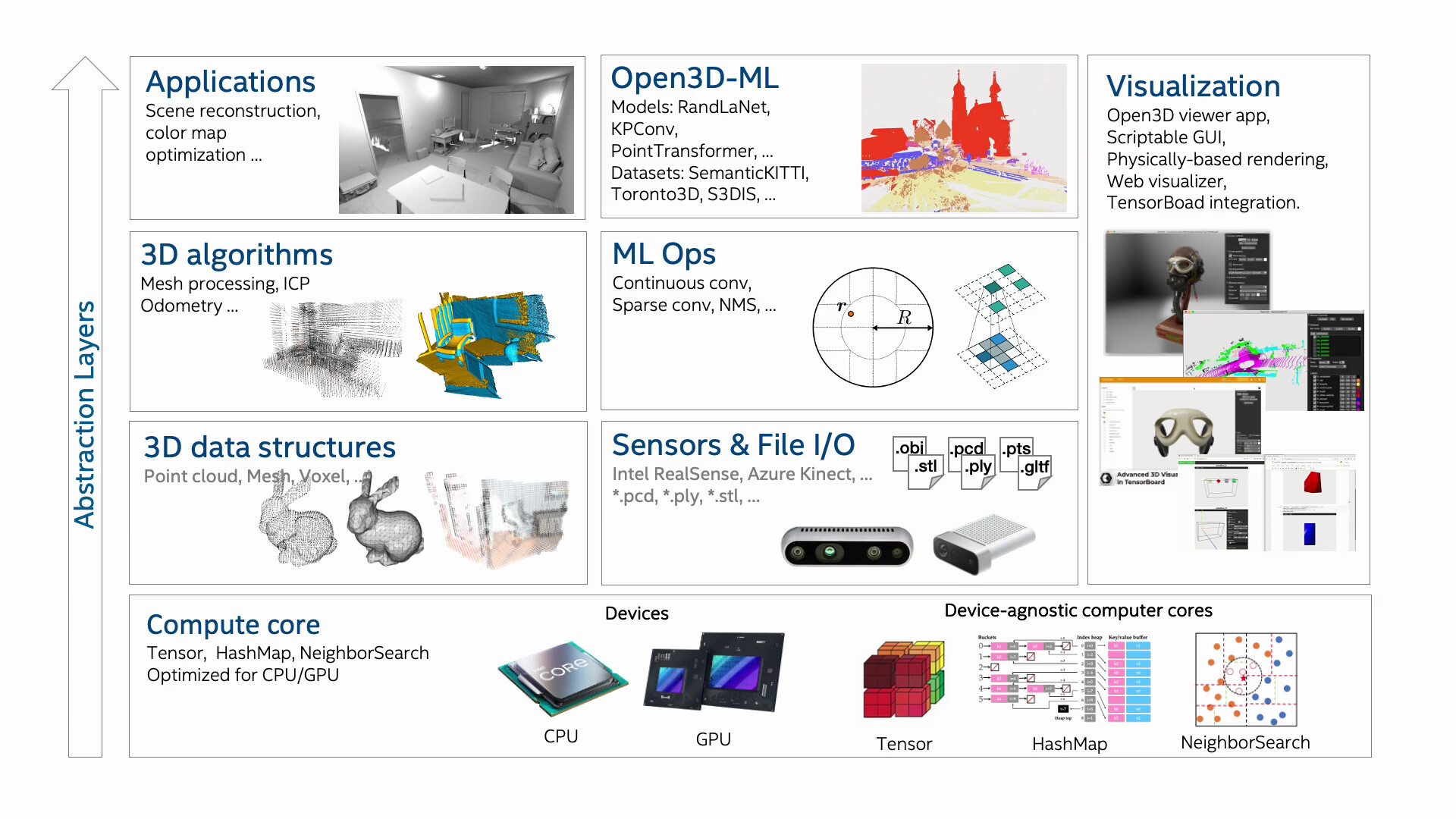
Here's a brief overview of the different components of Open3D and how they fit
together to enable full end to end pipelines:
For more, please visit the [Open3D documentation](https://www.open3d.org/docs).
## Python quick start
Pre-built pip packages support Ubuntu 20.04+, macOS 10.15+ and Windows 10+
(64-bit) with Python 3.8-3.11.
```bash
# Install
pip install open3d # or
pip install open3d-cpu # Smaller CPU only wheel on x86_64 Linux (v0.17+)
# Verify installation
python -c "import open3d as o3d; print(o3d.__version__)"
# Python API
python -c "import open3d as o3d; \
mesh = o3d.geometry.TriangleMesh.create_sphere(); \
mesh.compute_vertex_normals(); \
o3d.visualization.draw(mesh, raw_mode=True)"
# Open3D CLI
open3d example visualization/draw
```
To get the latest features in Open3D, install the
[development pip package](https://www.open3d.org/docs/latest/getting_started.html#development-version-pip).
To compile Open3D from source, refer to
[compiling from source](https://www.open3d.org/docs/release/compilation.html).
## C++ quick start
Checkout the following links to get started with Open3D C++ API
- Download Open3D binary package: [Release](https://github.com/isl-org/Open3D/releases) or [latest development version](https://www.open3d.org/docs/latest/getting_started.html#c)
- [Compiling Open3D from source](https://www.open3d.org/docs/release/compilation.html)
- [Open3D C++ API](https://www.open3d.org/docs/release/cpp_api.html)
To use Open3D in your C++ project, checkout the following examples
- [Find Pre-Installed Open3D Package in CMake](https://github.com/isl-org/open3d-cmake-find-package)
- [Use Open3D as a CMake External Project](https://github.com/isl-org/open3d-cmake-external-project)
## Open3D-Viewer app
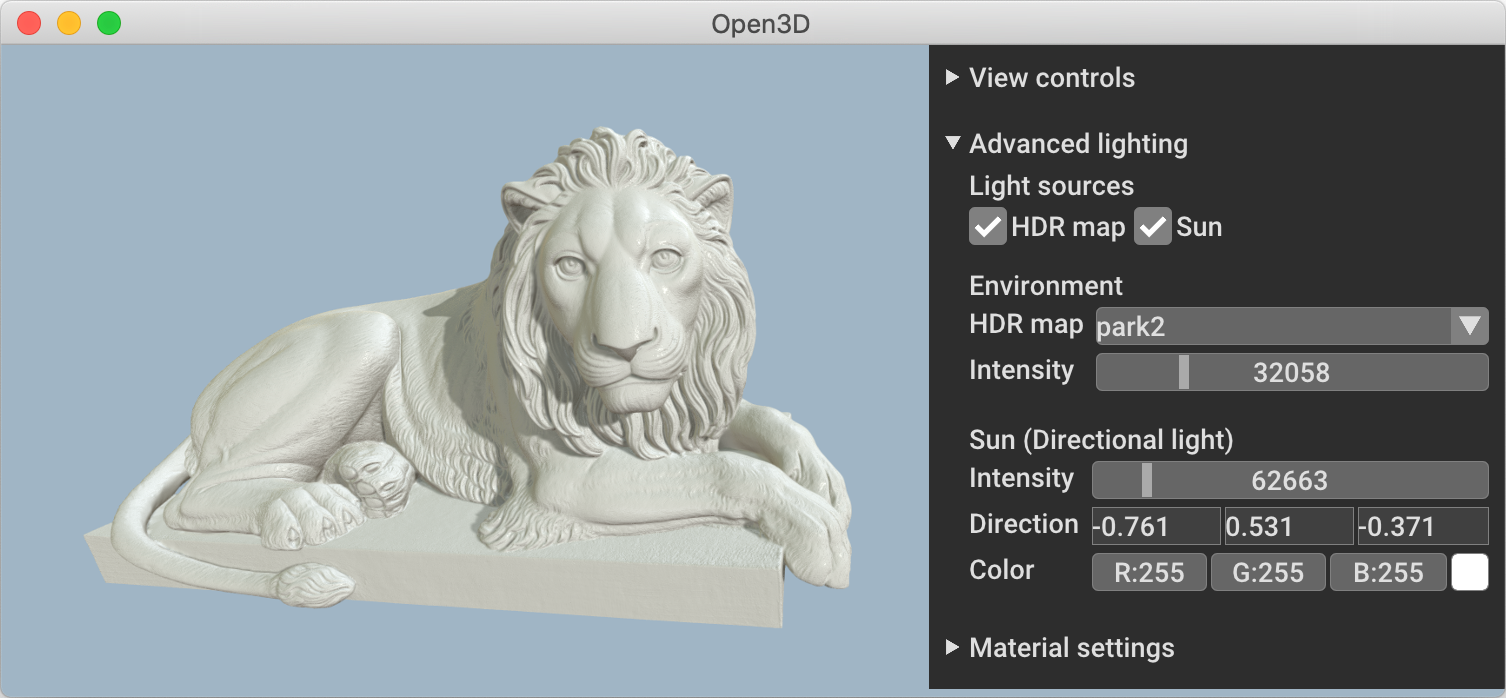 Open3D-Viewer is a standalone 3D viewer app available on Debian (Ubuntu), macOS
and Windows. Download Open3D Viewer from the
[release page](https://github.com/isl-org/Open3D/releases).
## Open3D-ML
Open3D-Viewer is a standalone 3D viewer app available on Debian (Ubuntu), macOS
and Windows. Download Open3D Viewer from the
[release page](https://github.com/isl-org/Open3D/releases).
## Open3D-ML
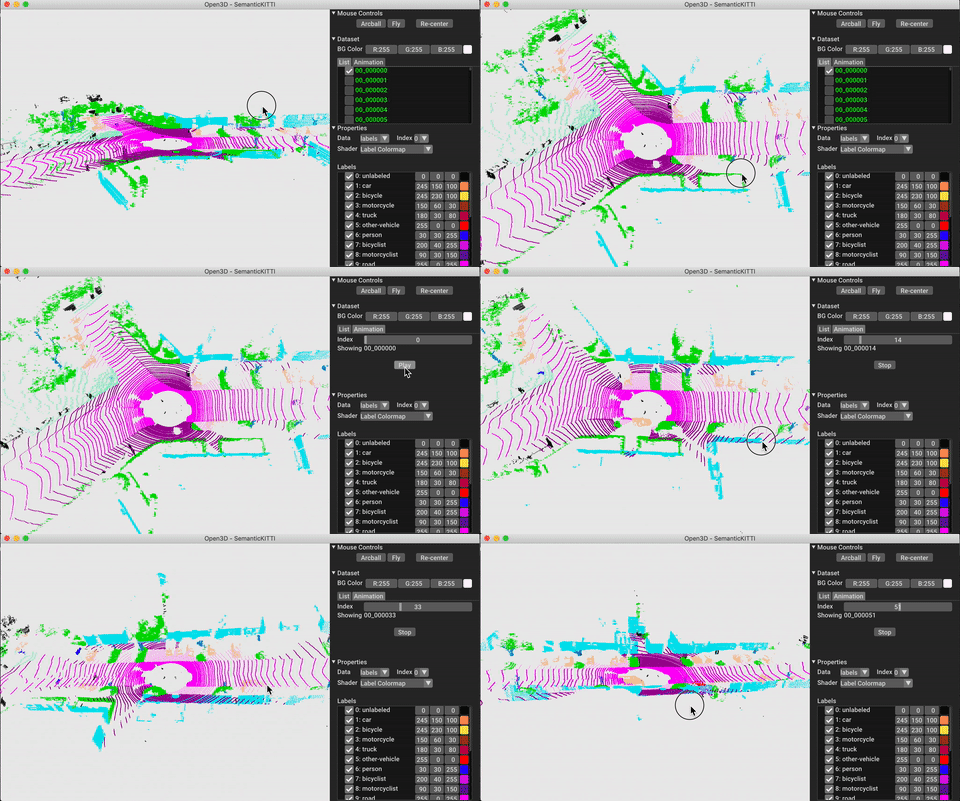 Open3D-ML is an extension of Open3D for 3D machine learning tasks. It builds on
top of the Open3D core library and extends it with machine learning tools for
3D data processing. To try it out, install Open3D with PyTorch or TensorFlow and check out
[Open3D-ML](https://github.com/isl-org/Open3D-ML).
## Communication channels
- [GitHub Issue](https://github.com/isl-org/Open3D/issues): bug reports,
feature requests, etc.
- [Forum](https://github.com/isl-org/Open3D/discussions): discussion on the usage of Open3D.
- [Discord Chat](https://discord.gg/D35BGvn): online chats, discussions,
and collaboration with other users and developers.
## Citation
Please cite [our work](https://arxiv.org/abs/1801.09847) if you use Open3D.
```bib
@article{Zhou2018,
author = {Qian-Yi Zhou and Jaesik Park and Vladlen Koltun},
title = {{Open3D}: {A} Modern Library for {3D} Data Processing},
journal = {arXiv:1801.09847},
year = {2018},
}
```
=======
# 3D点云
#### 介绍
{**以下是 Gitee 平台说明,您可以替换此简介**
Gitee 是 OSCHINA 推出的基于 Git 的代码托管平台(同时支持 SVN)。专为开发者提供稳定、高效、安全的云端软件开发协作平台
无论是个人、团队、或是企业,都能够用 Gitee 实现代码托管、项目管理、协作开发。企业项目请看 [https://gitee.com/enterprises](https://gitee.com/enterprises)}
#### 软件架构
软件架构说明
#### 安装教程
1. xxxx
2. xxxx
3. xxxx
#### 使用说明
1. xxxx
2. xxxx
3. xxxx
#### 参与贡献
1. Fork 本仓库
2. 新建 Feat_xxx 分支
3. 提交代码
4. 新建 Pull Request
#### 特技
1. 使用 Readme\_XXX.md 来支持不同的语言,例如 Readme\_en.md, Readme\_zh.md
2. Gitee 官方博客 [blog.gitee.com](https://blog.gitee.com)
3. 你可以 [https://gitee.com/explore](https://gitee.com/explore) 这个地址来了解 Gitee 上的优秀开源项目
4. [GVP](https://gitee.com/gvp) 全称是 Gitee 最有价值开源项目,是综合评定出的优秀开源项目
5. Gitee 官方提供的使用手册 [https://gitee.com/help](https://gitee.com/help)
6. Gitee 封面人物是一档用来展示 Gitee 会员风采的栏目 [https://gitee.com/gitee-stars/](https://gitee.com/gitee-stars/)
>>>>>>> 1fabb2c21ebaae85b529831f38110741ced2b588
Open3D-ML is an extension of Open3D for 3D machine learning tasks. It builds on
top of the Open3D core library and extends it with machine learning tools for
3D data processing. To try it out, install Open3D with PyTorch or TensorFlow and check out
[Open3D-ML](https://github.com/isl-org/Open3D-ML).
## Communication channels
- [GitHub Issue](https://github.com/isl-org/Open3D/issues): bug reports,
feature requests, etc.
- [Forum](https://github.com/isl-org/Open3D/discussions): discussion on the usage of Open3D.
- [Discord Chat](https://discord.gg/D35BGvn): online chats, discussions,
and collaboration with other users and developers.
## Citation
Please cite [our work](https://arxiv.org/abs/1801.09847) if you use Open3D.
```bib
@article{Zhou2018,
author = {Qian-Yi Zhou and Jaesik Park and Vladlen Koltun},
title = {{Open3D}: {A} Modern Library for {3D} Data Processing},
journal = {arXiv:1801.09847},
year = {2018},
}
```
=======
# 3D点云
#### 介绍
{**以下是 Gitee 平台说明,您可以替换此简介**
Gitee 是 OSCHINA 推出的基于 Git 的代码托管平台(同时支持 SVN)。专为开发者提供稳定、高效、安全的云端软件开发协作平台
无论是个人、团队、或是企业,都能够用 Gitee 实现代码托管、项目管理、协作开发。企业项目请看 [https://gitee.com/enterprises](https://gitee.com/enterprises)}
#### 软件架构
软件架构说明
#### 安装教程
1. xxxx
2. xxxx
3. xxxx
#### 使用说明
1. xxxx
2. xxxx
3. xxxx
#### 参与贡献
1. Fork 本仓库
2. 新建 Feat_xxx 分支
3. 提交代码
4. 新建 Pull Request
#### 特技
1. 使用 Readme\_XXX.md 来支持不同的语言,例如 Readme\_en.md, Readme\_zh.md
2. Gitee 官方博客 [blog.gitee.com](https://blog.gitee.com)
3. 你可以 [https://gitee.com/explore](https://gitee.com/explore) 这个地址来了解 Gitee 上的优秀开源项目
4. [GVP](https://gitee.com/gvp) 全称是 Gitee 最有价值开源项目,是综合评定出的优秀开源项目
5. Gitee 官方提供的使用手册 [https://gitee.com/help](https://gitee.com/help)
6. Gitee 封面人物是一档用来展示 Gitee 会员风采的栏目 [https://gitee.com/gitee-stars/](https://gitee.com/gitee-stars/)
>>>>>>> 1fabb2c21ebaae85b529831f38110741ced2b588